1. What is PSBank Online Account Opening?
PSBank Online Account Opening is a digital functionality in PSBank Mobile App which enables users to open a PSBank Peso Savings or Prepaid Mastercard Account.
- No need to go to the branch
- You only need only one (1) primary valid ID and a selfie
- Processing is with just a few taps on the Bank’s Mobile App
- You can apply whenever, wherever you want
- Average Daily Balance (ADB) of PhP5,000 to earn interest (For PSBank Peso Savings)
2. Who can open accounts in PSBank Online Account Opening?
- Filipino Citizens, aged 18 and above.
To be able to receive a One-Time Password (OTP), the mobile number of the applicant should be locally accessible (Country Code +63).
3. What are the deposit accounts that I can open through the Online Account Opening in PSBank Mobile?
- For Non-PSBank customers and PSBank loan clients with no existing deposit accounts:
- PSBank Peso Savings
(No initial deposit and maintaining balance)
- For PSBank deposit accountholders:
- PSBank Peso Personal ATM Savings
- PSBank Peso Time Deposit
- PSBank Prepaid Mastercard
4. How do I open a PSBank account via PSBank Mobile?
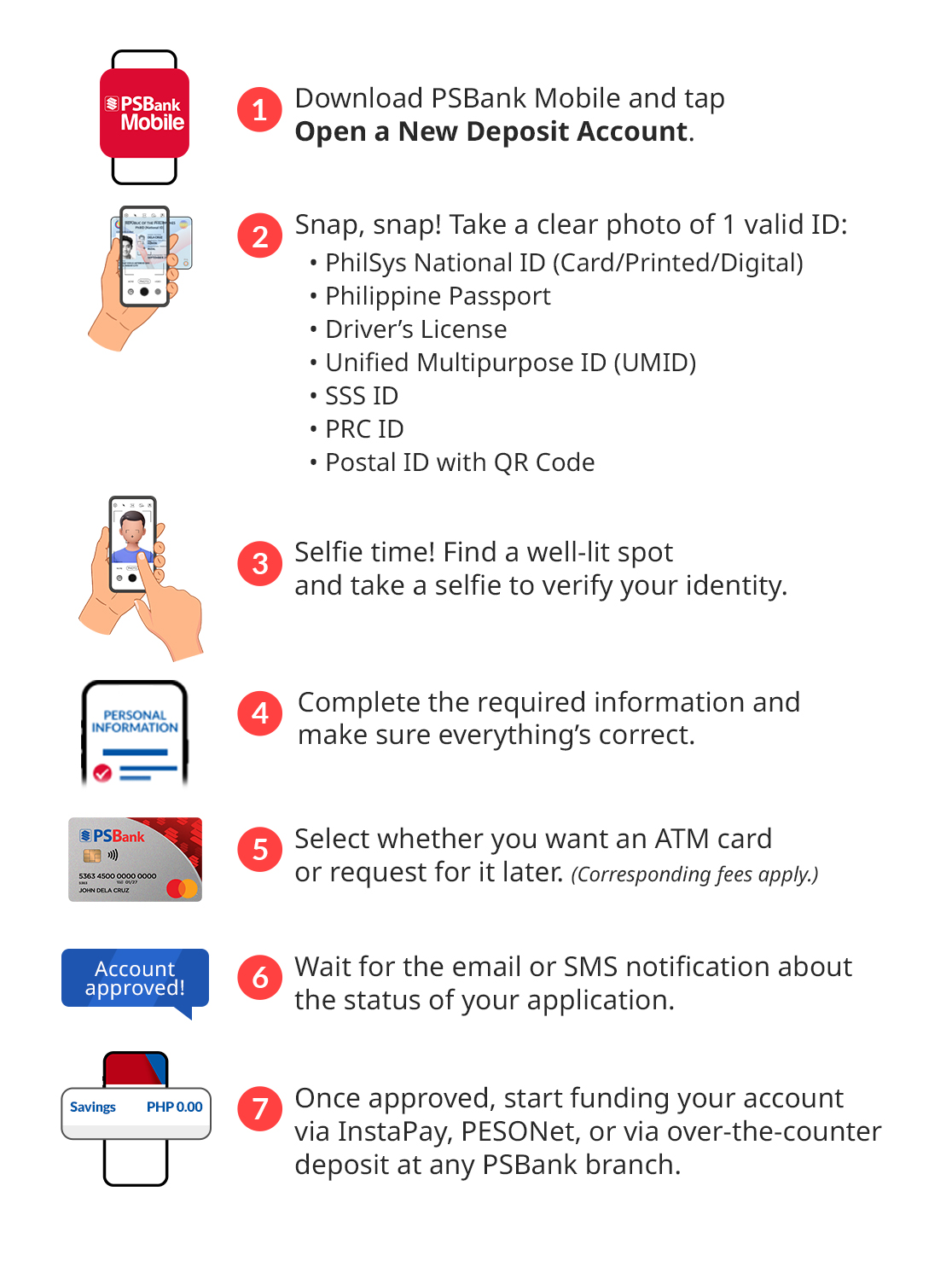
A. FOR NEW-TO-PSBANK CUSTOMERS
B. FOR EXISTING PSBANK DEPOSIT CUSTOMERS
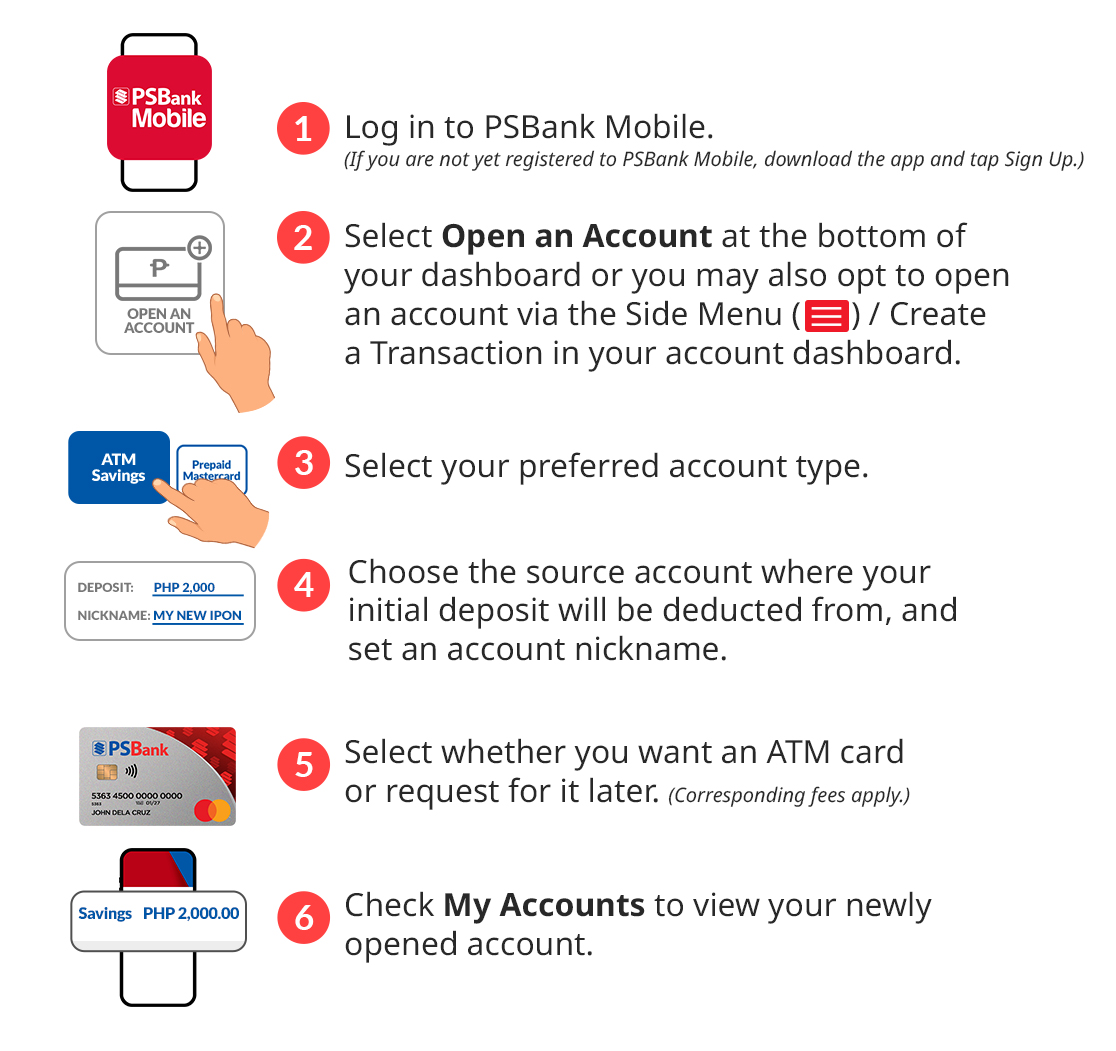
Note: If you are already an existing PSBank Customer enrolled in Mobile App, you may also open an another account via PSBank Online.
C. FOR EXISTING PSBANK LOAN CLIENTS
If you are not yet registered in PSBank Mobile, please follow the steps for NEW-TO-PSBANK CUSTOMERS.
If you are already signed up in PSBank Mobile, simply log in, select Open an Account at the bottom of the dashboard or via the side menu, and provide the required information.
5. Can I open a joint account via the Online Account Opening facility?
No. Joint accounts are not allowed.
6. When will my PSBank Online Account Opening request be approved?
Upon submission of all the required information, you will be given a system-generated reference number. All information gathered will be automatically sent for review and processing. Once approved, you will be notified on the approval of your application via SMS and email.
7. Is there a limit in the amount which I can deposit to my newly opened savings account?
PSBank Peso Savings – no limit
PSBank Peso Time Deposit – minimum placement of PhP10,000
PSBank Prepaid Mastercard – maximum reload amount of PhP100,000 per month
8. Is there a deadline in funding my newly opened savings account?
Yes. You should fund your savings account within 90 calendar days from the date the account was opened. Please note that accounts which remain unfunded after 90 days will be automatically closed. Likewise, your access in PSBank Mobile will be deactivated if there are no active accounts enrolled on the App.
9. If the request for an ATM card is optional, how can I withdraw cash from my newly opened savings account?
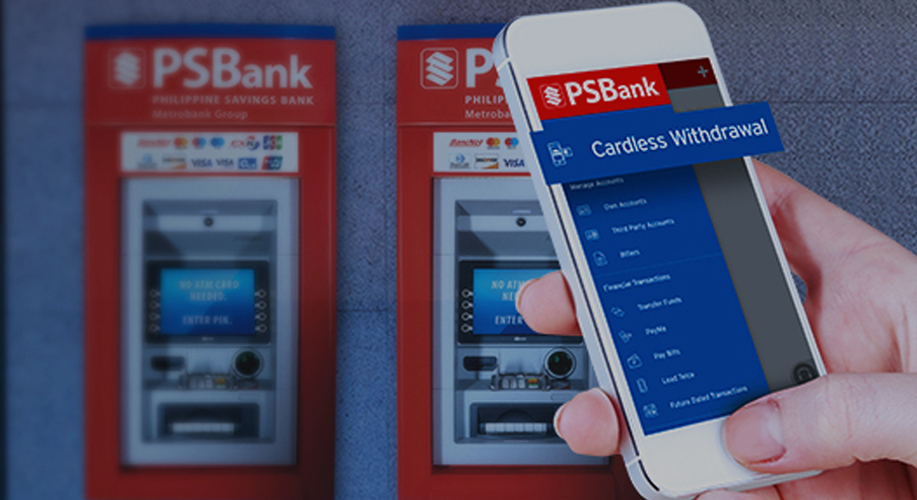
Using PSBank Mobile or PSBank Online, you can withdraw cash from your newly opened savings account through Cardless Withdrawal. You will be required to nominate your 4-digit Personal ID number (PIN) and you will be given a system-generated unique 6-digit PIN. Using these PINs, you can withdraw up to PhP30,000 per day at any PSBank or Metrobank ATMs.
If you need to withdraw more the PhP30,000, you may visit any PSBank branch to make an over-the-counter (OTC) withdrawal.
Please note that there will be an OTC fee of PhP50 if withdrawn amount is PhP100,000 and below, and a fee of PhP100 if withdrawn amount is more than PhP100,000.
10. What can I do with my newly opened savings account?
Your newly opened savings account will be automatically enrolled in PSBank Mobile and PSBank Online.
Upon log-in, you can perform the following transactions:
- Inquire your balance
- Monitor your accounts
- Transfer funds to PSBank and other banks using account number or QR code
- Load Toll RFIDs in real-time
- Open and Manage Peso Time Deposits
- Send cash instantly 24/7 via PaSend
- Withdraw cash without an ATM card via Cardless Withdrawal
- Mobile Check Deposit
- Pay Bills 24/7
- Lock and unlock your ATM cards to secure funds
- Collect Cash from other PSBank accounts via PayMe
- Reload prepaid and broadband
- Other existing and future electronic banking services
11. What should I do if my account opening request failed or was declined?
When your request failed or was declined, you will be given a system-generated application reference number. You may contact our Customer Experience Hotline at (632) 8845-8888 for your inquiries and concerns. Simply provide the reference number.
12. In case I need to submit additional documents related to my account opening request, where can I have it submitted?
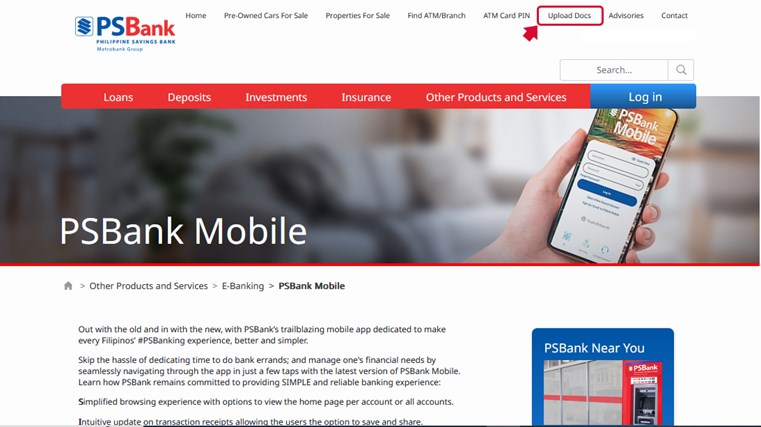
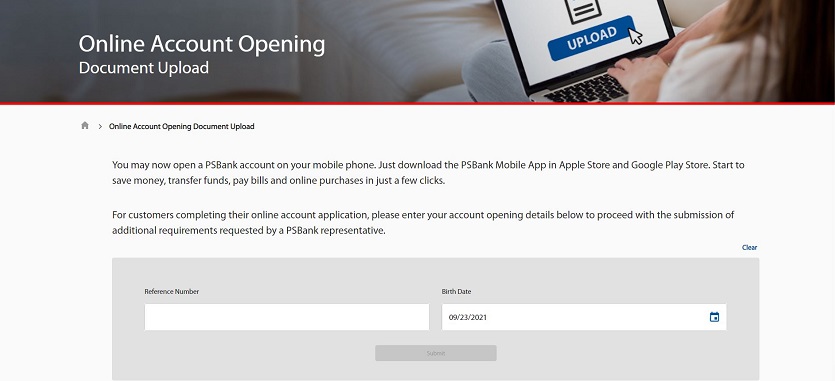
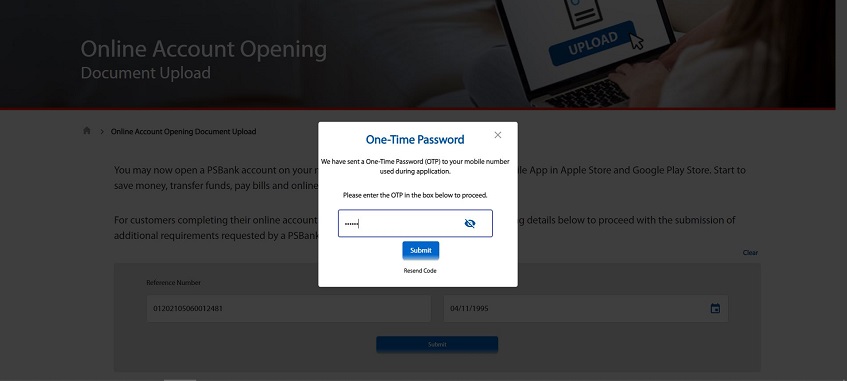
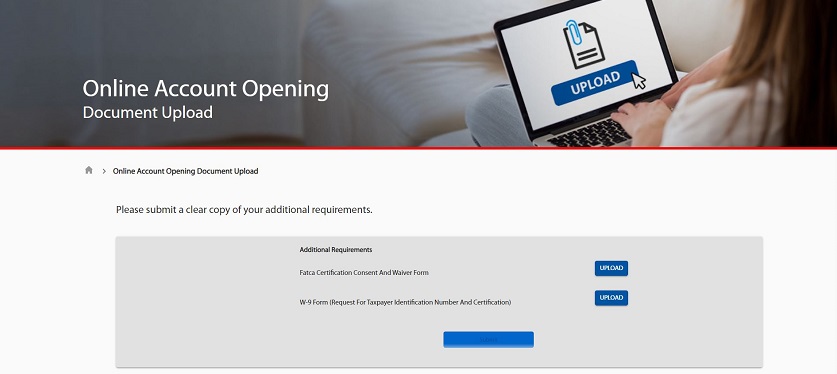
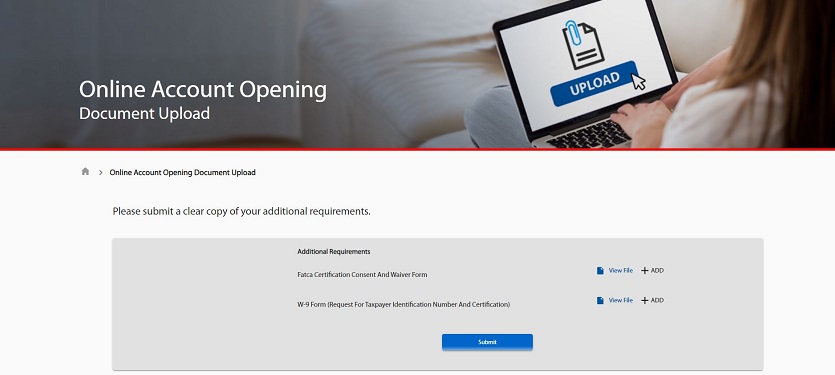
Upon receipt of the SMS and email notification about the additional documents you need to submit, you may upload the required documents to the PSBank Corporate Website: www.psbank.com.ph. Simply click on “Upload Docs” at the upper right side menu bar of the website. For your security, you will be required to provide or input your system-generated Online Account Application Reference Number and Date of Birth before you could upload the additional documents.
13. What should I do if I don’t receive any feedback from the Bank on my Online Account Opening application after three (3) working days?
If after three working days you don’t receive any feedback from the Bank on your Online Account Opening application, you may call our Customer Experience Hotline at (632) 8845- 8888 to inquire about the status of your request.
14. Is there a service fee for the ATM card I requested?
Initial issuance of PSBank Debit and Prepaid Mastercard is free of charge. However, if you requested or instructed that your ATM card be delivered to your registered mailing address, a fee of PhP200.00 will be debited from your account to cover courier charges. For accounts with no required initial deposit, the delivery fee will be deducted from your account’s available balance once the account has been funded with more than PhP200. ATM card request and its delivery to your mailing address will only be processed after the bank has debited the delivery fee from your account.
15. Is it safe to have my ATM card delivered to my mailing address?
Yes. For added security, the ATM card that will be delivered to your mailing address is not yet activated. To activate your ATM card and nominate PIN (Personal Identification Number), simply:
Step 1: Log-in to PSBank Mobile or Online Banking.
Step 2: Select Manage ATM Card from “Create a Transaction”, Side Menu or via Carousel
Step 3: Select Activate Card / Nominate PIN
Step 4: Input the last 4 digits of your card number
Step 5: Nominate and confirm your 6-digit PIN
Step 6: Input the One-Time Password (OTP) that will be sent to your registered mobile number if OTP is valid, card will be activated and ready for use.
16. When will my ATM card be delivered?
You may expect delivery of your ATM card 5 to 10 banking days from the date of request and debit of delivery fee from your account.
Should there be delays in the delivery of your ATM card, the Bank will send you an SMS to update you of the delivery status.
If you don’t receive your ATM card after 10 banking days, and you did not receive an SMS from our Bank representatives, kindly report it and call our Customer Experience Hotline at (632) 8845-8888.
17. Can I authorize someone else to receive my ATM card?
Yes. However, you will need to provide an authorization letter in favor of your authorized representative. Upon delivery of the ATM card to your mailing address, your authorized representative should present the signed authorization letter and both your original IDs.
18. Can I authorize someone else to pick-up my ATM card from the branch?
No. Pick up of ATM card from the branch via a representative is not allowed.
19. I would like to have my ATM card delivered to my mailing address. However, the address registered in PSBank Mobile is not updated. Shall I proceed with my ATM card request?
No. You need to call our Customer Experience Hotline at (632) 8845- 8888 and request for the updating of your mailing address before requesting for the delivery of your ATM card.
20. I opted to pick up my ATM card at a PSBank branch, can I pick it up on the same day I visit the nearest branch in the area?
Yes. The branch can process your request for ATM card on the day of your visit. Simply present the reference number of your request and the original copy of the primary ID you uploaded in the Online Account Opening facility to the New Accounts Section.
21. I initially did not request for an ATM card when I opened an account via the PSBank Online Account Opening facility, can I still request for an ATM card?
Yes. You may still request for an ATM card. Simply,
Step 1: Log-in to PSBank Mobile or Online Banking.
Step 2: Select "Manage ATM Card" from “Create a Transaction”, Side Menu or via Carousel
Step 3: Select “Request for ATM Card” icon.
Step 3: Select how you want to receive your ATM card from the following options:
• Deliver to my Mailing Address
• Pick up from any PSBank Branch
Step 4: Tap on the “Submit” button.
22. Can I cancel my Online Account Opening application?
No. Account Opening Application submitted via PSBank Mobile can no longer be cancelled.
23. Is there a limit on the number of accounts that I can open via PSBank Mobile app?
Yes, you can only open one (1) account via PSBank Mobile. Time Deposit placement via app is not covered by this limit.
24. What is FATCA Declaration?
FATCA or Foreign Account Tax Compliance Act Declaration is a document for US Persons. US Persons are identified through indicators or “US indicia,” as follows: (1) US Citizenship, including dual citizenship, or a lawful permanent US resident; (2) US place of birth; (3) Residence or correspondence address in the US; (4) Standing instructions to transfer funds to an account maintained in the US or directions regularly received from a US address; (5) An “in care of” or “hold mail” address that is the sole address with respect to the client; and, (6) Power of attorney or signature authority granted to a person with a US address.
25. What is PEP?
PEP or Politically Exposed Person refers to an individual who is or has been entrusted with prominent public position in the Philippines with substantial authority over policy, operations or the use or allocation of government-owned resources, a foreign state or an international organization. The term PEP also includes immediate family members and close relationships and associates that are reputedly known to have: (1) Joint beneficial ownership of a legal entity or legal arrangement with the main/principal PEP; (2) Sole beneficial ownership of a legal entity or legal arrangement that is known to exist for the benefit of the main/principal PEP.
26. What do I do if I have further inquiries or concerns on my PSBank Online Account Opening application?
For further inquiries or concerns on your PSBank Online Account Opening application, you may call our 24/7 Customer Experience Hotline at (632) 8845-8888, e-mail us at [email protected] or visit any PSBank Branch near you. You may also LiveChat with us at www.psbank.com.ph.